
Exporting ads for every platform
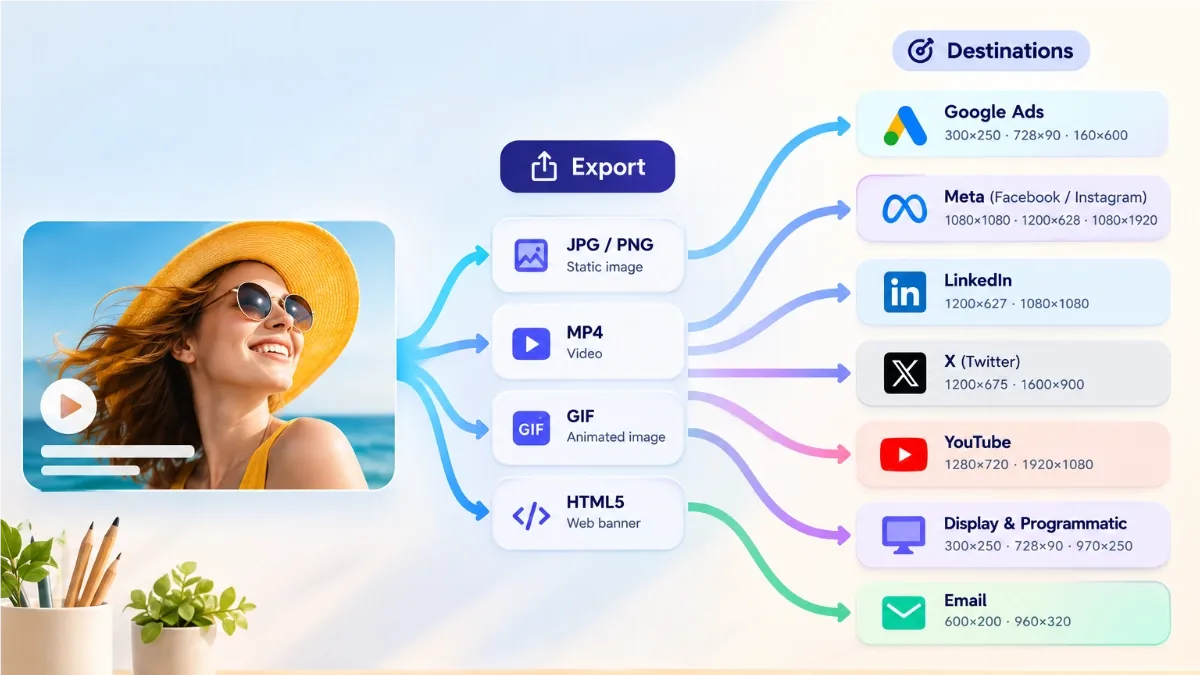
You have designed the ad. Now it has to leave the editor in a format its destination will actually accept, and every destination has opinions. This is a practical map from "where is this running?" to "which export button do I press?" in JUMI Ad Animator.
The map at a glance
| Destination | Typical sizes | Best format |
|---|---|---|
| Google Display Network / ad servers | 300×250, 728×90, 320×50 … | HTML5 package or GIF, under 150 KB |
| Meta / Instagram feed | 1080×1080 | MP4 |
| Stories and Reels | 1080×1920 | MP4 |
| 1200×627 | MP4 or PNG/JPG still | |
| Your own website | Any | Animated WebP |
| Email newsletter | Any | GIF |
| Documents, decks, mockups | Any | PNG/JPG still |
Display networks and ad servers
For Google Display Network, Google Ad Manager, DoubleClick and most modern ad servers, you have two good options. The HTML5 banner package exports either as a single self-contained file or as a ZIP with assets, and is the format ad servers treat as first-class. The animated GIF is the universal fallback that everything accepts.
Either way, the constraints are the same: stick to the standard fixed sizes (the 300×250 medium rectangle, 728×90 leaderboard, 320×50 mobile banner and friends are all built into the editor), keep the file under the 150 KB reference limit for display ads, keep animation to roughly 30 seconds, and make sure it stops after a few loops. The GIF export's target-file-size control lets you aim at a KB budget directly.
Meta, Instagram and other social feeds
Social platforms do not want banner files; they want video. Export MP4 at the social sizes built into the editor: 1080×1080 for square feed posts and 1080×1920 for stories and Reels. The MP4 export uses H.264, which every platform ingests happily, and very large canvases are automatically stepped down to keep the video encoder within its limits. This is also where the optional Smooth transition style pays off, since a feed video can afford gentler motion than a 150 KB banner ever could.
LinkedIn's single-image and video ads sit at 1200×627. The editor's 1200×628 landscape preset is the same shape for practical purposes, or type 1200×627 as a custom size if you want to match the spec exactly. Animated content goes out as MP4; if you are running a static sponsored post, a crisp PNG still often performs just as well and uploads instantly.
Your own website and newsletter
On pages you control, no ad network is vetoing your format, so use the most efficient one: animated WebP. It is 24-bit colour, animates smoothly and produces impressively small files. The only reason it is not the answer everywhere is that most ad networks reject it, which does not matter on your own site.
Email is the awkward one. Most email clients will not play video, and many strip or freeze modern formats, but the humble GIF has worked in email for decades. Export a GIF for newsletter headers and promos, and design the first frame to carry the message on its own, because a few clients only show frame one.
Stills for everything else
Sometimes the destination is a PDF, a pitch deck, a print-of-screen mockup or a platform that only takes images. Export a PNG (crisp, lossless) or JPG (smaller for photographic designs) of any frame. The 1x/2x/3x resolution options are handy here: a 2x still of a 300×250 banner gives you a 600×500 image that stays sharp in a document.
Always check the spec sheet
The table above covers the common cases, but specs drift and networks differ. Before a campaign goes live, find the destination's current spec page and confirm three things: the weight limit in KB, the animation length allowed, and the loop rules (most display networks require animation to stop after a few loops, which the exports respect). Two minutes of checking beats a rejected creative on launch day.
Shipping a whole campaign
A real campaign is rarely one size. Build a multi-size set in the editor, use copy-and-fit to adapt one design across every size, then export the lot: the HTML5 export can package everything as a ZIP ready to hand to an ad ops team or upload in one go. One design session, one ZIP, every slot filled.
Related: Keeping GIF file size down · The banner size guide